-
Booth (Support): https://yoriyoi.booth.pm/items/8034221
-
X (Announcements): https://x.com/vrc_eun
お問い合わせはBoothまたはメールのみ受け付けております。 その他の方法でのご連絡は、返信が遅れる場合があります。
Quick Setup
プロジェクトには、シェーダー・アバター・Modular Avatar があらかじめインポートされている必要があります。
-
まず Material Pack をインポートします。
-
次に Outfit Package をインポートします。
-
衣装の Prefab をアバターのルートにドラッグ&ドロップします。
その後、必要に応じてマテリアル・オブジェクト・シェイプキーを調整してください。
프로젝트엔 셰이더, 아바타, 모듈러아바타가 임포트 되어 있어야합니다.
-
먼저 마테리얼 패키지를 임포트하고 의상 패키지를 임포트하세요.
-
의상 프리팹을 아바타 루트에 Drag and Drop 합니다.
필요한 경우 마테리얼을 바꾸거나, 오브젝트를 추가/제거하거나, 클리핑이 있는지 확인하여 아바타의 쉐이프키 또는 오브젝트, 애니메이션을 조정합니다.
Your project must already have the shader, avatar, and Modular Avatar imported.
-
Import the Material Pack first.
-
Import the Outfit Package next.
-
Drag and drop the outfit Prefab into the avatar root.
After that, adjust materials, objects, and shape keys as needed.
1. セットアップガイド Setup Guide
-
本製品は Modular Avatar を使用して、必要な
Shrink/Deleteシェイプキーを自動設定します。必ず事前に Modular Avatar を導入してください。 -
衣装ファイルを読み込む前に、必ずマテリアルパッケージを先にインポートしてください。
-
衣装が意図通りに動作しない場合は、事前設定済みの
Shrink/Deleteシェイプキーに加えて、追加で適用することを推奨します。 -
テクスチャの作業解像度は4Kですが、アップロード時の最適化のため Unity 側でダウンサイジングしています。
-
본 제품은 Modular Avatar를 사용하여 필요한
Shrink/Delete셰이프키를 자동으로 설정합니다. 반드시 사전에 Modular Avatar를 설치해주세요. -
의상 파일을 불러오기 전에, 반드시 마테리얼 패키지를 먼저 임포트해주세요.
-
의상이 의도대로 작동하지 않을 경우, 사전 구성된
Shrink/Delete셰이프키 외에 추가 적용을 권장합니다. -
텍스처 작업 해상도는 4K이며, 업로드 최적화를 위해 Unity에서 다운사이징되었습니다.
-
This product uses Modular Avatar to automatically configure the required
ShrinkandDeleteshape keys. Please install Modular Avatar beforehand. -
Import the material package first, then import the outfit file.
-
If the outfit does not function as intended, consider applying additional
ShrinkorDeleteshape keys beyond the preconfigured ones. -
The textures were created at 4K resolution but have been downsized in Unity for upload optimization.
2. 改変に関して Customization
帽子のサイズや角度の調整について
-
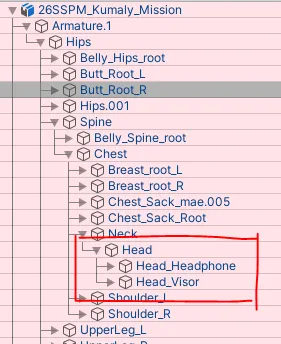
ヘッドホン・サンバイザーのサイズ・角度・位置は、
Armature > Hips > Spine > Chest > Neck > Head > Head_Headphone/Visor
のパスから調整できます。 -
You can adjust the size, angle, and position of the headphones/Visor via the following path:
Armature > Hips > Spine > Chest > Neck > Head > Head_Headphone/Visor -
헤드폰/바이저의 크기, 각도, 위치는
Armature > Hips > Spine > Chest > Neck > Head > Head_Headphone/Visor경로에서 조정할 수 있습니다.
-
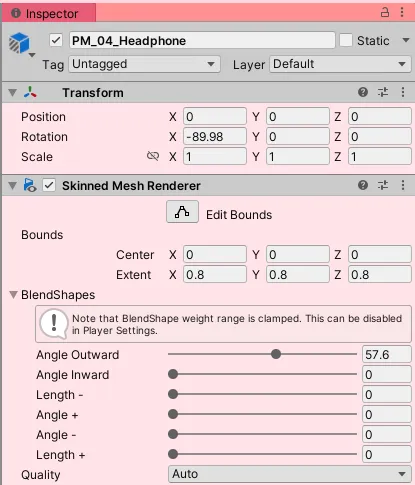
そのほか、ヘッドホンの調整(ちょうせい)に使用(しよう)するシェイプキーとして、
Angle、Lengthなどがあります。 -
이외에도, 헤드폰의 조정을 위한 셰이프키
Angle,Length등이 있습니다. -
In addition, there are shape keys for adjusting the headphones, such as
Angle,Length.
プレハブ使用に関する注意 Prefab Information
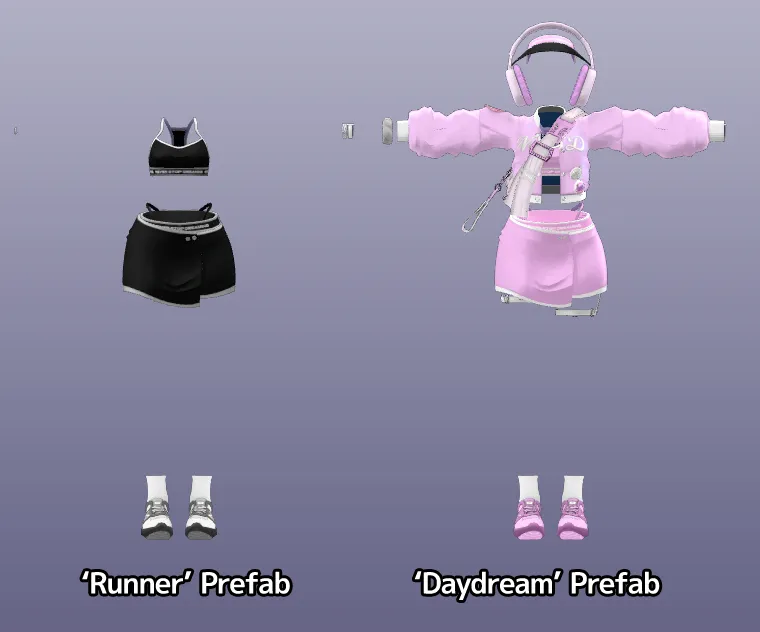
PaceMakerのプレハブ内では、コンセプトに応じて一部オブジェクトが有効または無効になっている場合があります。一部アクセサリーが表示されない場合がありますが、これは仕様であり不具合ではありません。
Armatureのサイズや位置を調整する場合については十分な検証が行われていないため、動作の安定性は保証できません。
PaceMaker 프리팹에는 각 콘셉트에 맞게 일부 오브젝트가 활성화되거나 비활성화되어 있을 수 있습니다. 일부 액세서리가 표시되지 않는 것은 의도된 설정이며, 불량이 아닙니다.
Armature의 크기 또는 위치를 조정하는 경우에 대해서는 충분한 테스트가 이루어지지 않았으므로, 이에 따른 동작 안정성은 보장되지 않습니다.
Some objects within the PaceMaker prefab may be enabled or disabled depending on the intended concept. If certain accessories are not visible, this is intentional and not a defect.
Adjusting the size or position of the Armature has not been thoroughly tested; therefore, stability cannot be guaranteed.
マテリアル設定について Material for safety
必要に応じて複数のマテリアルを使用することが可能です。ただし、同一マテリアルを共有しているオブジェクトに対して、複数種類のマテリアルを混在させることは推奨していません。
ご希望の組み合わせがない場合に備えてPSDファイルを同梱していますので、必要に応じてご活用ください。
Multiple materials can be used as desired. However, mixing different material variations on objects that share the same material is not recommended.
If your preferred combination is not available, a PSD file is included for customization. Please feel free to use it as needed.
원하는 만큼 복수의 마테리얼을 사용할 수 있지만, 같은 마테리얼을 공유하는 오브젝트는 한두 가지 이상의 마테리얼을 사용하는 것을 권장하지는 않습니다. 원하는 조합이 없는 경우 PSD파일을 동봉해드리고있으니 적극적으로 이용해주세요.
同梱アルファマップについて
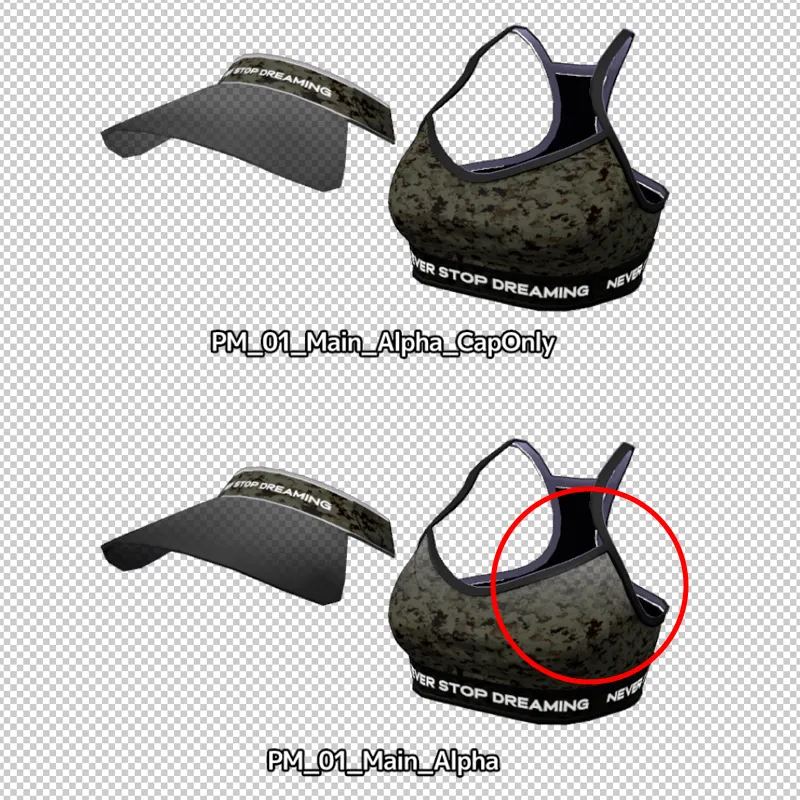
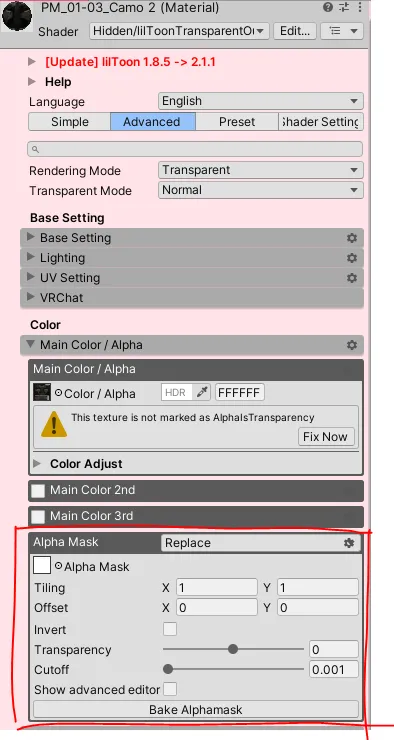
PM_01_Top用のアルファマップは2種類あり、PM_01_TopおよびPM_01_Visorの両方に影響します。デフォルトでは PM_01_Main_Alpha_CapOnly が適用されていますが、必要に応じて PM_01_Main_Alpha に変更することが可能です。
PM_01_Top용 알파맵은 두 가지 종류가 있으며, PM_01_Top과 PM_01_Visor 모두에 영향을 줍니다.
기본적으로는 PM_01_Main_Alpha_CapOnly가 적용되어 있으며, 필요에 따라 PM_01_Main_Alpha로 변경하여 사용할 수 있습니다.
Two alpha map variations are available for PM_01_Top, affecting both PM_01_Top and PM_01_Visor.
PM_01_Main_Alpha_CapOnly is applied by default, but it can be replaced with PM_01_Main_Alpha if needed.
腕時計の背景変更方法 Watch Customization
-
時計マテリアルの場所:
26SS_PaceMaker\Mat\PM_00_Face -
あらかじめ用意された時計背景テクスチャは、
26SS_PaceMaker\Mat\Texture\00_Faceに含まれています。 -
時計マテリアル(
PM_00_Face)の Base Map を差し替えることで背景を変更できます。 -
新しいテクスチャを追加してカスタマイズする場合は、必ず 正方形(1:1比率)のテクスチャ をご使用ください。
-
시계 마테리얼 위치:
26SS_PaceMaker\Mat\PM_00_Face -
사전 제작된 시계 배경 텍스처는
26SS_PaceMaker\Mat\Texture\00_Face경로에 포함되어 있습니다. -
시계 마테리얼(
PM_00_Face)의 Base Map을 교체하여 배경을 변경할 수 있습니다. -
커스터마이즈를 위해 새로운 텍스처를 추가하는 경우, 반드시 정사각형(1:1 비율) 텍스처를 사용해주세요.
-
Material location:
26SS_PaceMaker\Mat\PM_00_Face -
Pre-made watch background textures can be found at:
26SS_PaceMaker\Mat\Texture\00_Face -
You can change the background by replacing the Base Map of the watch material (
PM_00_Face). -
When adding a custom texture, please use a square (1:1 ratio) texture.
シェイプキーの説明
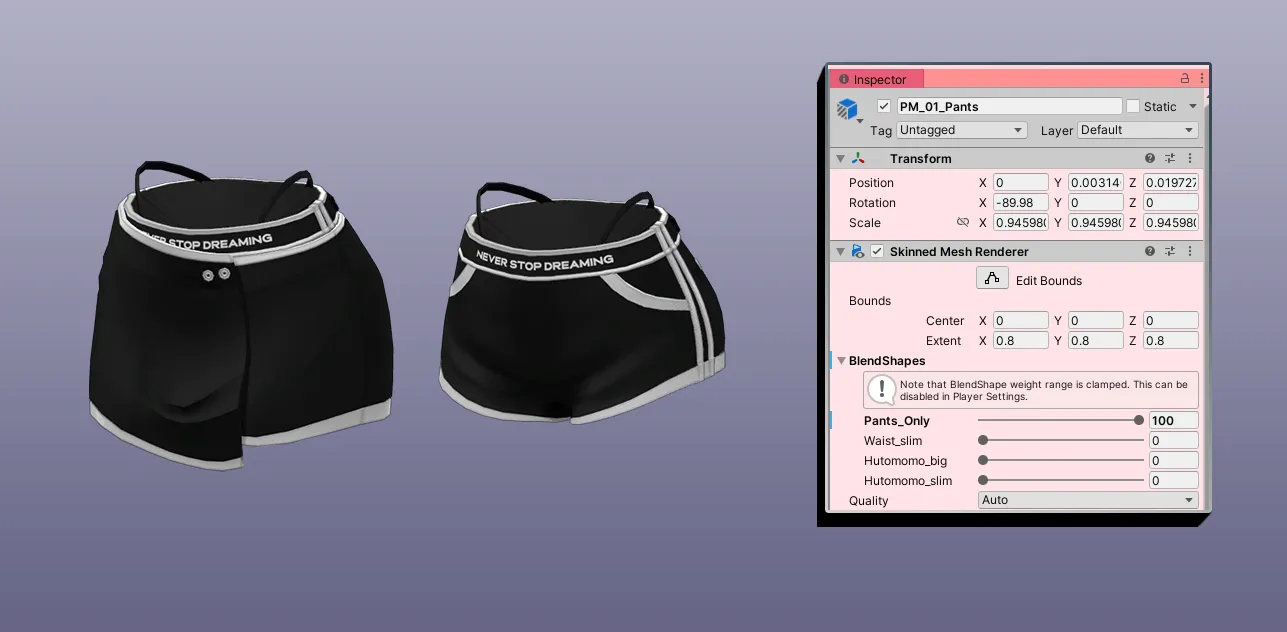
必要に応じて PM_01_Skirt オブジェクトを無効化できます。その場合は、PM_01_Pants に含まれている Pants_Only シェイプキーを併せて適用してください。
また、スカートを無効化した状態で PM_06_Strap02 を使用する場合は、対応するシェイプキーが用意されていますので、必ず併せて適用してください。
필요한 경우 PM_01_Skirt 오브젝트를 비활성화할 수 있습니다. 이 경우 PM_01_Pants에 포함된 Pants_Only 쉐이프키를 함께 적용해주세요.
You may disable the PM_01_Skirt object if needed. In this case, please apply the Pants_Only shape key located in PM_01_Pants.
If you use PM_06_Strap02 while the skirt object is disabled, a corresponding shape key is available and should also be applied.
3. Tris Count
以下の仕様は、Shinanoを基準として作成されています。
MG_Prefab ▲74,994
├── Armature_PM
├── PM_01_Pants ▲2,668
├── PM_01_Panty ▲408
├── PM_01_Skirt ▲1,990
├── PM_01_Top ▲1,962
├── PM_01_Visor ▲506
├── PM_02_Runner ▲5,316
├── PM_03_Buttons ▲1,504
├── PM_03_Jacket ▲5,752
├── PM_04_Headphone ▲3,056
├── PM_04_Wrist ▲3,240
├── PM_05_Sack ▲10,826
├── PM_06_Harness ▲4,632
├── PM_06_Harness02 ▲3,204
├── PM_06_Strap01 ▲1,440
└── PM_06_Strap02 ▲1,112
Support Shapekey
Airi
- Breasts_Big, Breasts_Small, vBreasts_Flat (use with small)
Manuka
- Breast_big, Breast_big_PLUS (only used with Breast_big shape key)
Selestia
- Breast_big
Kumaly
- Breast_big, Pochari_upper, Pochari_lower, Diet_upper, Diet_lower
Milfy/Eku
- Breast_big, Breast_small, Hutomomo_slim, Hutomomo_big
Chocolat/Chiffon/Lime
- Breasts_big, Breasts_small
Milltina
- (No bra)Breasts_Cow, (No bra)Breasts_Small, Waist_wide, Thigh_small
Shinano
- Breasts_big, Breasts_flat, Hip_big
4. Files
📂PaceMaker_x.x.x_Avatar.Zip
├── PaceMaker.Unitypackage
├ ├── Fbx
├ └── Prefab
└── Readme.link
📂PaceMaker_x.x.x_MaterialPack.Zip
├── liltoon_installation.link
├── PaceMaker.Unitypackage\ɴᴇᴠᴇʀꜱᴛᴏᴘᴅʀᴇᴀᴍɪɴɢ
├ ├── 26SS_PaceMaker\Mat
├ ├ ├── PM_01_Main
├ ├ ├── PM_02_Runner
├ ├ ├── PM_03_Jacket
├ ├ ├── PM_04_Ac1
├ ├ ├── PM_05_Sack
├ ├ ├── PM_06_Ac2
├ ├ └── Texture\(Same structure as Mat)
├ ├── MatCapresso™
├ ├ ├── Black_Light.png
├ ├ └── Silver_Glossy_Crystal.png
├ └── Scripts\Runtime\InspectorNote.cs
└── Readme.link
📂PaceMaker_x.x.x_PSD.Zip
├── PM_01_Main_PSD.psd
├── PM_02_Runner_PSD.psd
├── PM_03_Jacket_PSD.psd
├── PM_04_Ac_PSD.psd
├── PM_05_Sack_PSD.psd
└── PM_06_Ac2_PSD.psd
SHA256
| PaceMaker_0.3.3_Airi.zip | 05119C8528BEB450A0891427D48FBDE759F22F29B1D05596B3F61E8C136E99C5 |
| PaceMaker_0.3.3_ChiffonChocolatLime.zip | C76E062C072DDB0BB61CCFAA2E36A5C4A53F85D8FC1E8395EA918A66745EA026 |
| PaceMaker_0.3.3_Kumaly.zip | DB5879582D10E099F410A1A442173BAD5491992870FDDF6451AA7F8851C48173 |
| PaceMaker_0.3.3_Manuka.zip | 07C9D021AE3767AE5782971AE15529A133A6C82996416E1AD19DC76930986C84 |
| PaceMaker_0.3.3_MaterialPack.zip | A33F9F18830A8A4C093C31F39A358EF8E22FB430F2D63164C83307A47F657244 |
| PaceMaker_0.3.3_MilfyEku.zip | DC747F3A773FC14F9044C520D03899FBEF37409A49386E7AF567171394AA81C1 |
| PaceMaker_0.3.3_Milltina.zip | C20B95731DA5AF472961ECD26E7BE130482CEB460A34E9BF70FAC71B2AD0EC29 |
| PaceMaker_0.3.3_PSD.zip | 56DADEDA64AB47116D55D5EB74E64A83288F9CDFCF824564E6236ACB3EA756DF |
| PaceMaker_0.3.3_Selestia.zip | 8B314FC220D7166446775C14E9F998403097DA9E775FF90F641DB5DBD426BED0 |
| PaceMaker_0.3.3_Shinano.zip | 07D47F91E39F439C57F3BC61DF64D0EDAAC6BEFFB21BD606294417E20D9019A5 |
5. ご注意 Precautions
本アセットは現状のまま提供され、いかなる保証も行っておりません。 VRChatでの使用を前提として制作されており、それ以外の用途での使用についてはサポートできない場合があります。パブリックアップロードを含む、いかなる形式での再配布・再販売を禁止します。本コンテンツの使用により発生したいかなる損害・費用・損失についても、制作者は責任を負いません。 Booth以外で配布・販売されたファイルは非公式とみなされます。製品の完全性は保証できません。また、当該ファイルに関するサポートは行っておりません。無断再配布・再販売が確認された場合、著作権侵害として削除申請等の対応を行う場合があります。
This asset is provided “as is” without any warranties. It is intended for use in VRChat, and support may not be available for other purposes. Any form of redistribution, resale, or public upload is strictly prohibited. The creator assumes no responsibility for any damages, losses, or costs arising from the use of this content. Files distributed or sold outside of Booth are considered unofficial. Product integrity cannot be guaranteed, and support will not be provided for such files. Unauthorized redistribution or resale may result in copyright takedown requests and appropriate action.
본 애셋은 현 상태 그대로 제공되며, 별도의 보증은 제공되지 않습니다. 또한 VRChat에서의 사용을 전제로 제작되었으므로, 그 외의 용도로 사용 시 지원이 어려울 수 있습니다. 퍼블릭 업로드를 포함한 모든 형태의 재배포 및 재판매를 금지합니다. 콘텐츠 사용으로 인해 발생하는 어떠한 손해·비용·손실에 대해서도 제작자는 책임을 지지 않습니다. Booth 이외의 경로에서 배포되거나 판매된 파일은 비공식 파일로 간주됩니다. 제품의 무결성은 보장되지 않으며, 해당 파일에 대해서는 지원이 제공되지 않습니다. 무단 재배포 또는 재판매가 확인될 경우, 저작권 침해에 따른 삭제 요청 및 대응이 이루어질 수 있습니다.
6. 互換性情報 Compatibility
-
Airi_Ver1.01
-
Chiffon_v1.00
-
Chocolat_v1.01
-
Kumaly_ver1.00
-
MANUKA_ver1.02
-
Milfy_v1.5.0
-
Milltina_ver1.01.1
-
SELESTIA_ver1.02
-
Shinano_ver1.01.2_AMSv0.0.12
Modular Avatar 1.11.0にて動作確認済みです。最新のアップデート情報については、Boothページをご確認ください。
Confirmed to work with Modular Avatar 1.11.0. For the latest updates, please check the Booth page.
Modular Avatar 1.11.0에서 작동을 확인했습니다. 업데이트 정보는 Booth에서 확인 바랍니다.
7. License/Use in streaming platform
日本語 · English · 한국어 → Use in streaming platform
Last Modified: 2026.03.05