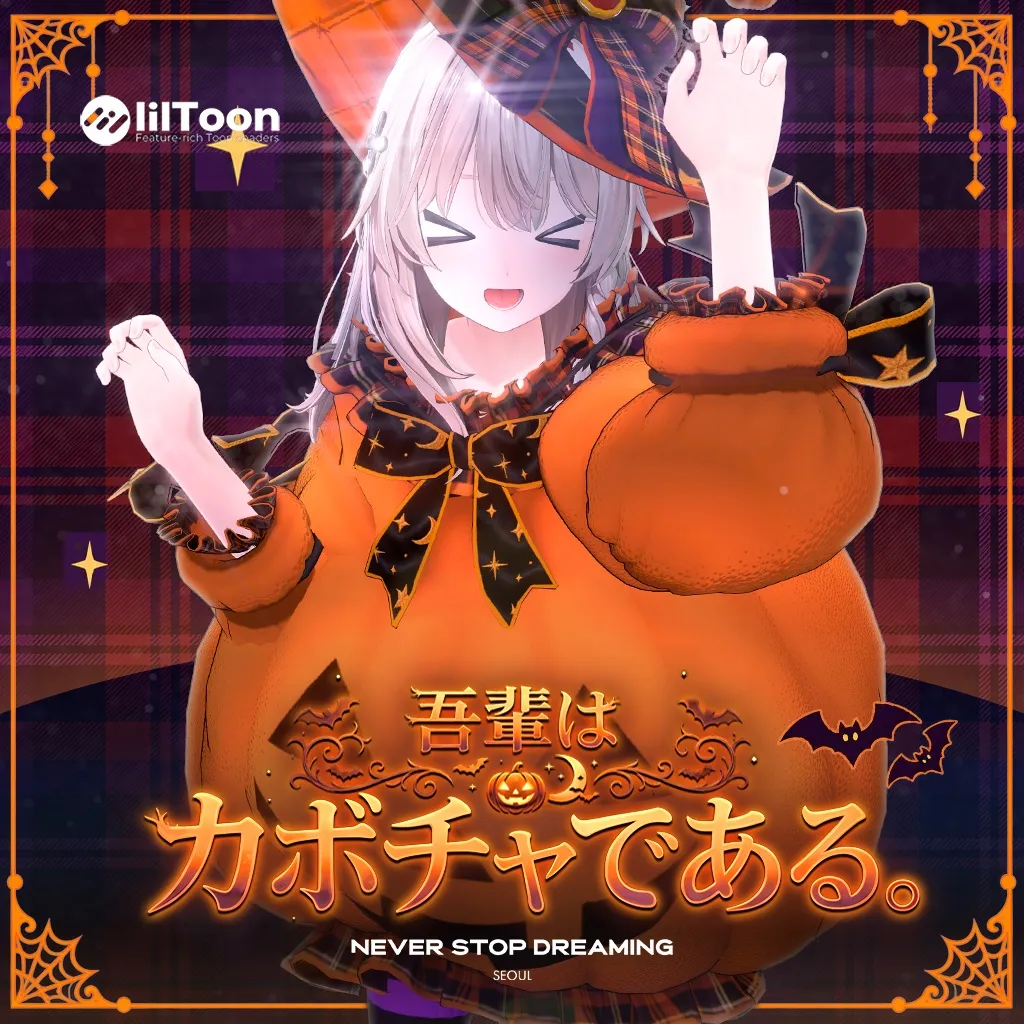
吾輩はカボチャである。中身はまだ無い。
나는 호박이로소이다. 속은 아직 비어 있다.
I am a pumpkin. As yet, I have no filling.
1. セットアップガイド|Setup Guide
日本語
- VRChatアバター用のUnityプロジェクトに、対応アバター、lilToon、Modular Avatarを先に導入してください。
- 先に共通の
26Halloween_0.2.0_Materials.unitypackage(マテリアル・テクスチャ)をインポートし、続いて使用するアバターの26Halloween_0.2.0_[Avatar].unitypackage(プレハブ・FBX)をインポートします。 ɴᴇᴠᴇʀꜱᴛᴏᴘᴅʀᴇᴀᴍɪɴɢ/クモラボ/26Halloween/内の26Halloween_[Avatar].prefabを、Hierarchy上のアバターのルート直下に配置してください。Armatureの中には入れません。- 元の衣装など、重なって表示されるオブジェクトを必要に応じて非表示にしてください。
- Play Modeなどで、腕を下ろした姿勢・歩行・しゃがみ・脚を上げた姿勢を確認してからアップロードしてください。
プレハブにはPhysBoneとModular Avatarの設定が含まれています。通常の導入では、手動でのボーン結合や、再度の「Setup Outfit」は不要です。
한국어
- VRChat 아바타용 Unity 프로젝트에 대응 아바타와 lilToon, Modular Avatar를 먼저 설치해 주세요.
- 공통
26Halloween_0.2.0_Materials.unitypackage(마테리얼·텍스처)를 먼저 임포트한 다음, 사용할 아바타의26Halloween_0.2.0_[Avatar].unitypackage(프리팹·FBX)를 임포트하세요. ɴᴇᴠᴇʀꜱᴛᴏᴘᴅʀᴇᴀᴍɪɴɢ/クモラボ/26Halloween/안의26Halloween_[Avatar].prefab을 Hierarchy의 아바타 루트 바로 아래에 넣어 주세요.Armature안에 넣지 않습니다.- 기존 의상 등 겹쳐 보이는 오브젝트는 필요에 따라 꺼 주세요.
- Play Mode 등에서 팔을 내린 자세, 걷기, 앉기, 다리를 들어 올리는 자세를 확인한 다음 업로드하세요.
프리팹에는 PhysBone과 Modular Avatar 설정이 포함되어 있습니다. 일반적인 도입 과정에서 수동 본 병합이나 추가적인 ‘Setup Outfit’은 필요하지 않습니다.
English
- Prepare a Unity project for your VRChat avatar with the matching avatar, lilToon, and Modular Avatar installed.
- Import the shared
26Halloween_0.2.0_Materials.unitypackage(materials and textures) first, then26Halloween_0.2.0_[Avatar].unitypackage(prefab and FBX) for your avatar. - Find
26Halloween_[Avatar].prefabunderɴᴇᴠᴇʀꜱᴛᴏᴘᴅʀᴇᴀᴍɪɴɢ/クモラボ/26Halloween/and place it directly under your avatar root in the Hierarchy, outside the avatar’sArmature. - Hide the original clothing or other overlapping objects as needed.
- Check poses with lowered arms, walking, sitting, and raised legs in Play Mode before uploading.
PhysBone and Modular Avatar settings are included in the prefab. Manual bone merging or running “Setup Outfit” again is not needed for normal installation.
必要なツール|필요한 도구|Required Tools
2. パーツ・マテリアル|Parts & Materials
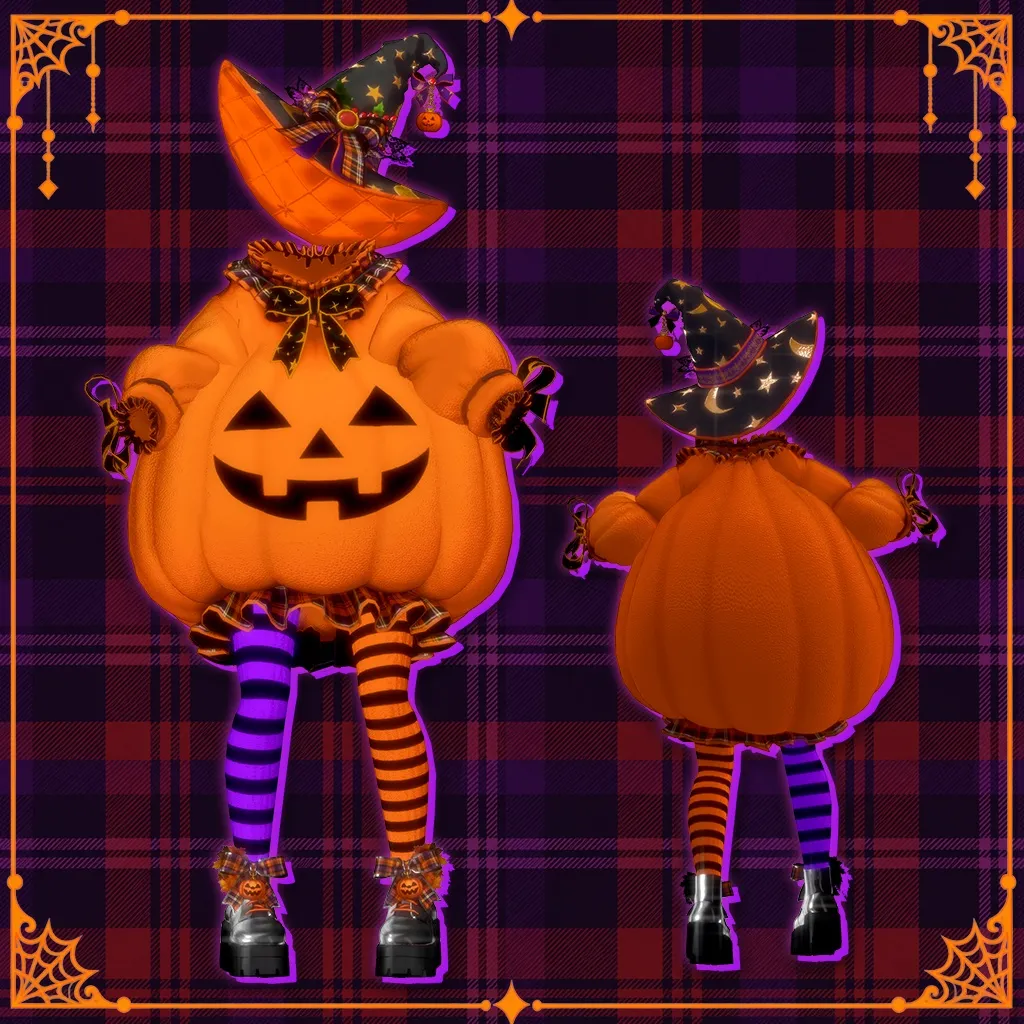
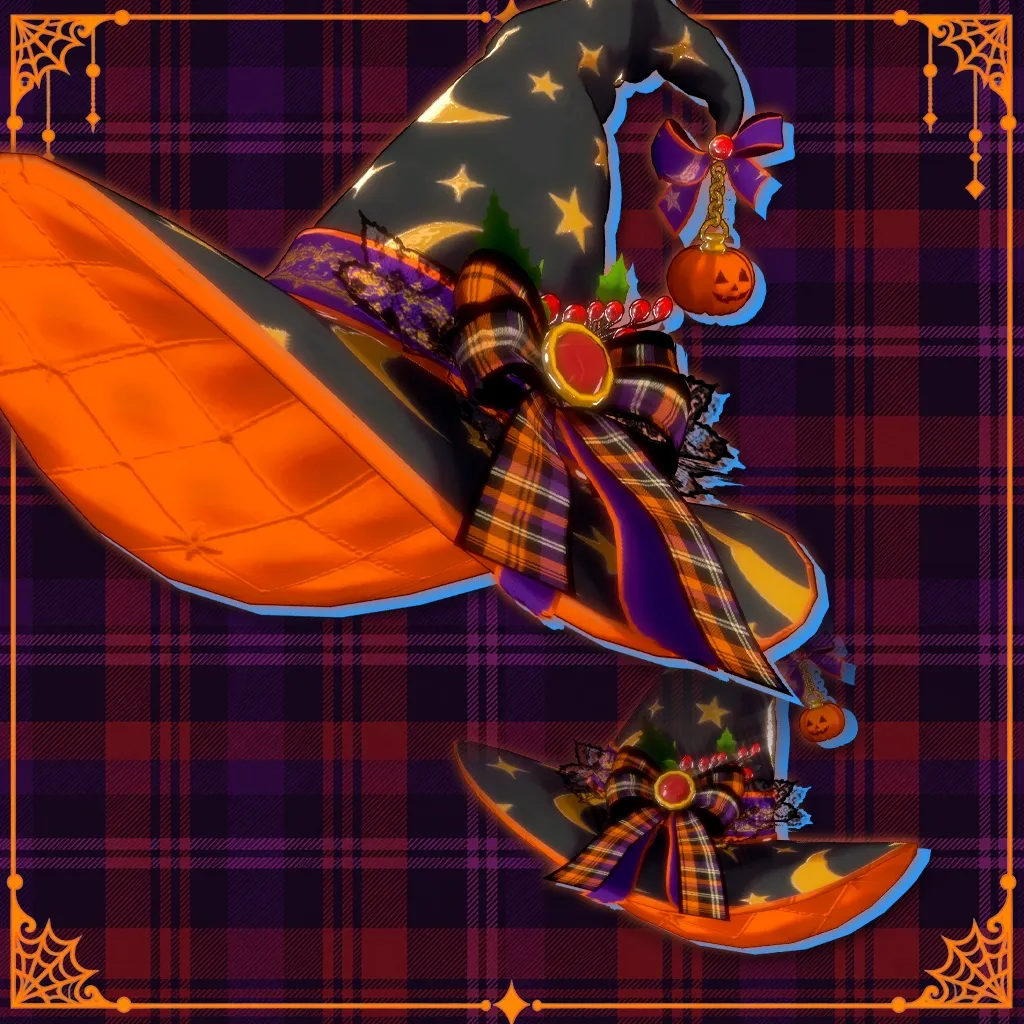
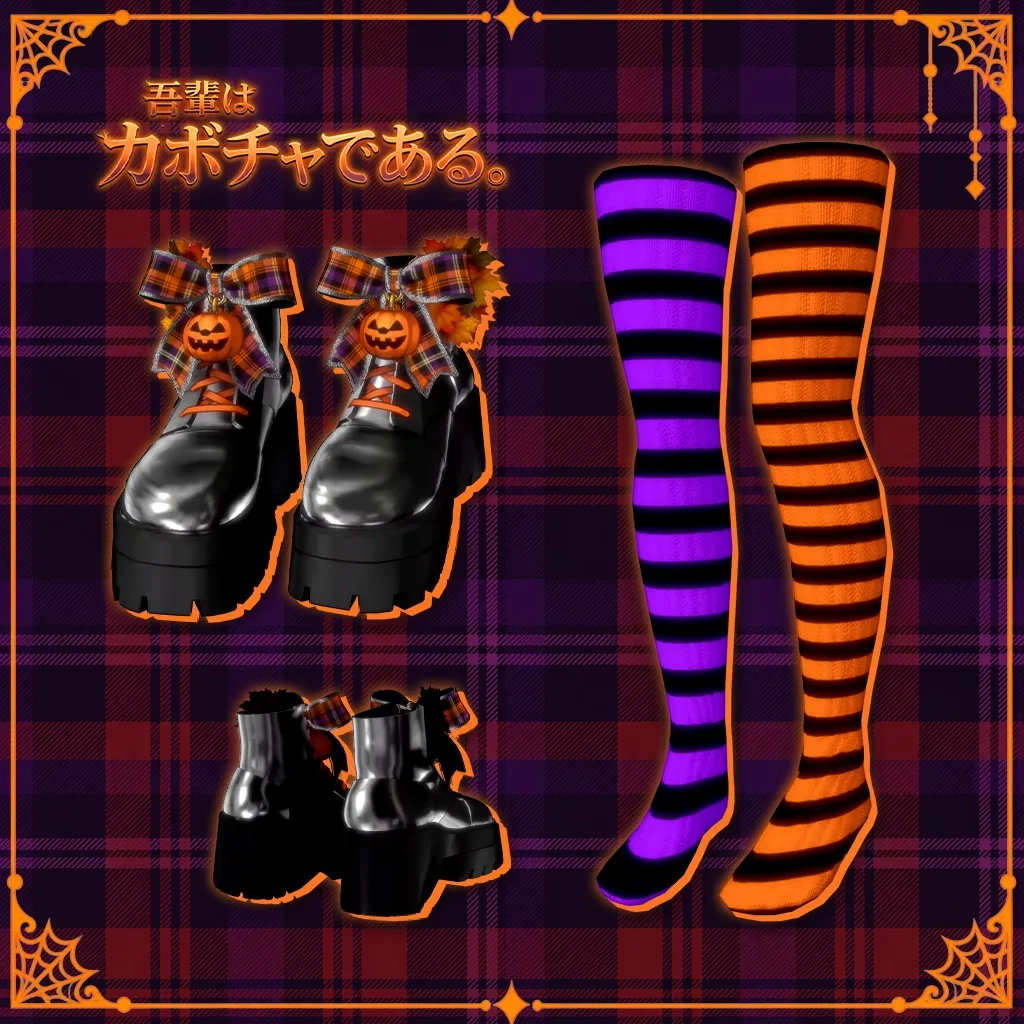
| Object | パーツ・파츠・Part | Material |
|---|---|---|
01-Cloth | カボチャ衣装 / 호박 의상 / Pumpkin outfit | 26Halloween_01_PumpkinDress |
02-WitchHat | 魔女帽子 / 마녀 모자 / Witch hat | 26Halloween_02_WitchHat |
03-Shoes | シューズ / 신발 / Shoes | 26Halloween_03_Shoes |
04-Stocking | ストッキング / 스타킹 / Stockings | 26Halloween_04_Stockings |
オブジェクト名には、アバター名の接尾辞が付く場合があります。マテリアルは 26Halloween/Mat/、テクスチャは 26Halloween/Mat/Texture/ にあります。
오브젝트 이름에는 아바타 이름이 접미사로 붙을 수 있습니다. 마테리얼은 26Halloween/Mat/, 텍스처는 26Halloween/Mat/Texture/에 있습니다.
Object names may have an avatar-name suffix. Materials are in 26Halloween/Mat/, and textures are in 26Halloween/Mat/Texture/.
3. 着用・改変のヒント|Fitting & Customization
素体のシェイプキー・クリッピング
本衣装はModular Avatarの Shape Changer を使用し、衣装に隠れる素体部分や、足元に必要なシェイプキーを設定しています。対象となるシェイプキーはアバターごとに異なります。
体型を変更した場合や、別の靴・ストッキングと組み合わせる場合は、各パーツに付いているShape Changerの設定を確認してください。素体側の設定だけを変更しても、アップロード時にShape Changerの値が適用される場合があります。
カボチャのボリュームが大きいため、深くしゃがむ・膝を胸に近づけるなどの姿勢では、脚や他のパーツが衣装に重なる場合があります。普段使用する動作で確認し、必要に応じて素体の Shrink / Delete 系シェイプキーを調整してください。
소체 셰이프키와 클리핑
이 의상은 Modular Avatar의 Shape Changer를 사용해 옷에 가려지는 소체 부위와 발 모양에 필요한 셰이프키를 설정합니다. 대상 셰이프키는 아바타마다 다릅니다.
체형을 수정했거나 다른 신발·스타킹과 조합한다면 각 파츠의 Shape Changer 설정을 확인해 주세요. 소체의 값만 바꾸더라도 업로드 시 Shape Changer의 설정값이 적용될 수 있습니다.
호박의 부피가 크기 때문에 깊게 앉거나 무릎을 가슴 쪽으로 당기는 자세에서는 다리나 다른 파츠가 의상과 겹칠 수 있습니다. 평소 사용하는 동작으로 확인하고, 필요한 경우 소체의 Shrink / Delete 계열 셰이프키를 조정해 주세요.
Body Shape Keys & Clipping
This outfit uses Modular Avatar’s Shape Changer to configure body shape keys for covered areas and the feet. The target shape keys differ between avatars.
If you change the body shape or combine the outfit with other shoes or stockings, check the Shape Changer settings on each part. Changing values on the body alone may not override the values applied by Shape Changer during upload.
The pumpkin has a large silhouette. Deep crouches or poses that bring the knees close to the chest may cause the legs or other parts to intersect with the outfit. Check your usual motions and adjust the body’s Shrink / Delete shape keys if needed.
髪・アクセサリーとの組み合わせ|헤어·액세서리 조합|Hair & Accessories
長い髪や他の揺れ物は、衣装に重なる場合があります。髪・アクセサリー側の形状やPhysBone設定に合わせて調整してください。
긴 머리카락이나 다른 흔들리는 장식은 의상을 뚫을 수 있습니다. 헤어·액세서리의 형태와 PhysBone 설정에 맞춰 조정해 주세요.
Long hair and other moving accessories may intersect with the outfit. Adjust the hair or accessory shape and PhysBone settings as needed.
4. 対応アバター|Supported Avatars
| アバター・아바타・Avatar | Prefab |
|---|---|
| しなの / Shinano | 26Halloween_Shinano.prefab |
| ミルティナ / Milltina | 26Halloween_Milltina.prefab |
| マヌカ / Manuka | 26Halloween_Manuka.prefab |
| ルルネ / Rurune | 26Halloween_Rurune.prefab |
| ミルフィ / Milfy | 26Halloween_Milfy.prefab |
| セレスティア / Selestia | 26Halloween_Selestia.prefab |
| 萌 / Moe | 26Halloween_Moe.prefab |
| シフォン / Chiffon | 26Halloween_Chiffon.prefab |
| 愛莉 / Airi | 26Halloween_Airi.prefab |
ご購入前に、使用するアバターに合ったバリエーションをお確かめください。アバター本体は含まれません。 販売価格・最新の対応状況・更新情報はBOOTHの商品ページをご確認ください。
구매 전 사용할 아바타에 맞는 옵션을 확인해 주세요. 아바타 본체는 포함되지 않습니다. 판매 가격, 최신 대응 현황과 업데이트 정보는 BOOTH 상품 페이지에서 확인해 주세요.
Please choose the variation matching your avatar. Avatar bases are not included. See the BOOTH product page for pricing, current availability, and updates.
5. 詳細仕様|Specifications
以下の仕様はShinano用の衣装を基準としています。アバター本体は含みません。アバター別の調整により、三角形数が異なる場合があります。
아래 사양은 시나노용 의상 기준입니다. 아바타 본체는 제외하며, 아바타별 조정에 따라 삼각형 수가 다를 수 있습니다.
The specifications below are based on the Shinano outfit, excluding the avatar base. Triangle counts may vary with avatar-specific fitting.
| Part | Triangles |
|---|---|
01-Cloth | 25,876 |
02-WitchHat | 10,352 |
03-Shoes | 12,232 |
04-Stocking | 1,880 |
| Total | 50,340 |
- Texture: 4096 × 4096
- Material slots: 4
- Materials: 4
- Shader: lilToon
- Setup: Modular Avatar
6. お問い合わせ・利用について|Support & Usage
ご質問・不具合のご報告は、BOOTHのメッセージからお知らせください。使用アバター名、衣装のバージョン、問題が発生する姿勢、スクリーンショットを添えていただけると確認しやすくなります。
퍼블릭 업로드를 포함한 데이터 재배포는 삼가 주세요. 문의나 오류 제보는 BOOTH 메시지로 보내 주세요. 사용 아바타, 의상 버전, 문제가 발생하는 자세와 스크린샷을 함께 보내 주시면 확인에 도움이 됩니다.
Please send questions or bug reports through BOOTH messages. Include your avatar name, outfit version, the pose that causes the issue, and screenshots to help us investigate.
パブリックアップロードを含むデータの再配布はご遠慮ください。
Please do not redistribute the files, including through public avatar uploads.
配信での利用|방송에서의 사용|Use in Streaming
日本語 · English · 한국어 → Streaming Guidelines
Last Modified: 2026.10.26