⚠Legal Disclaimer
JP
ご購入ありがとうございます!
以下は、より便利に導入・カスタマイズするためのTIPをまとめたガイドです。
衣装を適用するには、ɴᴇᴠᴇʀꜱᴛᴏᴘᴅʀᴇᴀᴍɪɴɢ/Nap'n'Chill/Prefab 内のプレハブをアバターのルートに配置してください。
枕ギミックを使用したい場合は Makura Ari フォルダ内のプレハブを、枕ギミックを使用しない場合は Makura Nasi フォルダ内のプレハブを選択してください。
1. マテリアル適用のTIP
マテリアルは4種類に分類されており、番号と名前で識別できます。同じマテリアルを共有するオブジェクトを選択して、マテリアルを割り当ててください。
1.1. Clothパーツ(衣装)
01で始まるパーツはClothカテゴリに属し、ɴᴇᴠᴇʀꜱᴛᴏᴘᴅʀᴇᴀᴍɪɴɢ/Nap'n'Chill/Mat/01 Cloth フォルダ内に格納されています。このフォルダ内のマテリアルはどれでも自由に適用可能です。
1.2. アクセサリーパーツ
02で始まるパーツはアクセサリーに分類され、ɴᴇᴠᴇʀꜱᴛᴏᴘᴅʀᴇᴀᴍɪɴɢ/Nap'n'Chill/Mat/02 Accs フォルダにあります。こちらも自由にマテリアルを適用可能です。
1.3. テディベア用マテリアル
03および04で始まるマテリアルは、テディベア本体およびその衣装に使用されます。
ɴᴇᴠᴇʀꜱᴛᴏᴘᴅʀᴇᴀᴍɪɴɢ/Nap'n'Chill/Mat/03 Teddy フォルダ内にあり、
・03はテディベア本体用
・04はテディベア衣装用
として、自由に組み合わせて使うことが可能です。
1.4. 枕マテリアル適用時の注意点
枕には特殊なパーティクルマテリアルが適用されています。
羽のパーティクルが白い四角に見える場合、パーティクル用マテリアルが正しく適用されていない可能性があります。枕マテリアルが誤って適用されていないかご確認ください。
1.5. その他注意事項
マテリアルの適用は個人の自由ですが、パフォーマンス向上のために色味を統一することを推奨します。
例えば、同じマテリアルを共有する上衣と下衣が異なる色(上:白、下:ピンク)であれば、2種類のテクスチャを読み込むことになり、自分だけでなく他のプレイヤーにも負荷がかかります。
そのため、同一マテリアルを共有するパーツにはできる限り統一されたマテリアルを使用してください。
2. トグル制作・アニメーションのTIP
アイマスクは様々なヘアアクセサリーに対応しやすくするため、Headボーンには直接接続されていません。そのため自由に位置・回転を調整可能です。
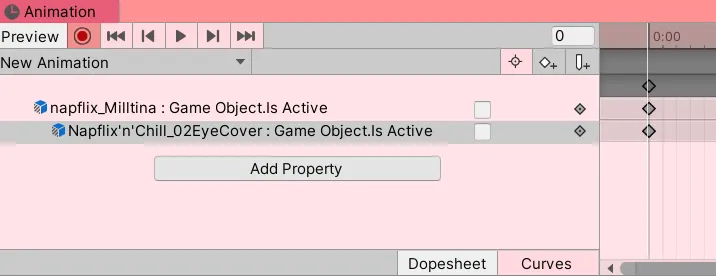
Modular AvatarのBone Proxy機能により自動的にHeadボーンに配置されますが、トグルアニメーションには画像のように個別にキーフレームを設定する必要があります。
3. 枕の装着位置と角度の調整
枕ギミック付きのプレハブには、左右の手それぞれに枕の装着位置情報を含むオブジェクトが含まれています。これを調整することで、自由に位置・角度を設定できます。
4. 不具合の報告およびご提案・お問い合わせ
不具合の報告やご意見・お問い合わせは、Boothのメッセージ、またはX(旧Twitter)@vrc_eunまでご連絡ください。Booth経由の方が返信が早いです。
5. 公式ハッシュタグ
#NSD_VRC のタグを付けてXに投稿していただけると嬉しいです!
KO
구매해주셔서 감사합니다! 아래는 더 편리하게 적용 및 개변을 위한 TIP을 안내하고 있습니다.
의상을 적용하려면 ɴᴇᴠᴇʀꜱᴛᴏᴘᴅʀᴇᴀᴍɪɴɢ/Nap'n'Chill/Prefab 에서 베개 기믹을 원하면 Makura Ari안에 있는 폴더 안에 있는, 혹은 베개 기믹을 원하지 않는다면 Makura Nasi 폴더 안에 있는 프리팹을 아바타 루트에 넣어주세요.
1. 마테리얼 적용 팁
마테리얼의 종류는 4가지로 숫자와 이름으로 구분되어 있습니다. 동일한 마테리얼을 공유하는 오브젝트를 선택하고 마테리얼을 할당하세요.
1.1. Cloth Parts
01로 시작하는 파츠들은 Cloth 파츠로 ɴᴇᴠᴇʀꜱᴛᴏᴘᴅʀᴇᴀᴍɪɴɢ/Nap'n'Chill/Mat/01 Cloth 폴더 안에 있습니다. 해당 폴더 안에 있는 마테리얼은 어떤 것이든 적용할 수 있습니다.
1.2. Accesories Parts
02로 시작하는 파츠들은 Acc 파츠로, ɴᴇᴠᴇʀꜱᴛᴏᴘᴅʀᴇᴀᴍɪɴɢ/Nap'n'Chill/Mat/02 Accs 폴더 안에 있습니다. 해당 폴더 안에 있는 마테리얼은 어떤 것이든 적용할 수 있습니다.
1.3. Teddy Materials
03 및 04로 시작하는 곰인형과 곰인형의 의상 색은 ɴᴇᴠᴇʀꜱᴛᴏᴘᴅʀᴇᴀᴍɪɴɢ/Nap'n'Chill/Mat/03 Teddy 폴더 안에 있습니다. 의상에는 04으로 시작하는 마테리얼을, 곰인형의 색은 03으로 시작하는 마테리얼을 자유롭게 교차 할당할 수 있습니다.
1.4. 베개 마테리얼 적용시 주의사항
베개 안에는 파티클에 적용되는 특수한 마테리얼이 적용되어 있습니다. 파티클이 깃털 대신 하얀색 네모로 보인다면 파티클 마테리얼 부분이 베개 마테리얼로 적용되어 있지 않은지 확인해주세요.
1.5. 기타 주의사항
마테리얼을 적용하는 것은 분명히 개인의 자유지만, 가급적 게임 내 퍼포먼스 향상을 위해 색상을 통일하는 것을 고려해주세요. 같은 마테리얼을 공유하는 상의와 하의로 예를 들면, 상의는 흰 색으로, 하의를 분홍색으로 하면 두 가지 색상의 텍스쳐를 모두 로드하게 되며, 자신 뿐만 아니라 월드에 존재하는 다른 사람의 시스템에도 부하를 주게 됩니다. 따라서 가능한 같은 마테리얼을 공유하는 파츠들에 마테리얼을 부여할 때에는 주의해주세요.
2. 토글 제작/애니메이션 팁
수면안대는 사용자가 다양한 헤어 악세사리에 대응하기 편하기 쉽게 하기 위해 Head본에 연결되어 있지 않습니다. 따라서 자유롭게 이동, 회전 등의 조정이 가능합니다. Modular Avatar의 Bone Proxy에 의해 자동으로 head bone 안에 들어가게 되므로, 토글 애니메이션에 아래 사진과 같이 별도의 키프레임을 추가해야합니다.
3. 베개가 장착될 위치와 각도 조절
베개 기믹이 있는 프리팹을 가져올 경우 프리팹 오브젝트 안에는 pillow socket 오브젝트 하위에 베개가 장착될 위치의 정보가 있는 오브젝트가 양 손에 하나씩 들어있습니다. 이 부분의을 통해 원하는 각도와 위치로 손쉽게 조정할 수 있습니다.
4. 오류의 보고 및 제안/문의
부스 메세지나 x.com/vrc_eun 으로 연락해주세요. 부스를 통해 더 빠른 답변을 받을 수 있습니다.
5 공식 해시태그
#NSD_VRC로 태그해서 X에 올려주시면 감사하겠습니다!
EN
Thank you for your purchase!
Here are some tips to help you apply and customize the outfit more easily.
To apply the outfit, go to ɴᴇᴠᴇʀꜱᴛᴏᴘᴅʀᴇᴀᴍɪɴɢ/Nap'n'Chill/Prefab.
If you want the pillow gimmick, use the prefab inside the Makura Ari folder.
If you don’t want the pillow gimmick, use the prefab inside the Makura Nasi folder.
Place the prefab under the root of your avatar.
1. Material Application Tips
There are four types of materials, each identified by a number and name.
Select the objects that share the same material and assign the appropriate one.
1.1. Cloth Parts
Parts starting with 01 are clothing items. You can find their materials in the ɴᴇᴠᴇʀꜱᴛᴏᴘᴅʀᴇᴀᴍɪɴɢ/Nap'n'Chill/Mat/01 Cloth folder.
Feel free to use any material from this folder.
1.2. Accessory Parts
Parts starting with 02 are accessories. Their materials are in the ɴᴇᴠᴇʀꜱᴛᴏᴘᴅʀᴇᴀᴍɪɴɢ/Nap'n'Chill/Mat/02 Accs folder.
You can use any material from there as well.
1.3. Teddy Materials
Materials starting with 03 and 04 are for the teddy bear and its outfit.
They’re located in the ɴᴇᴠᴇʀꜱᴛᴏᴘᴅʀᴇᴀᴍɪɴɢ/Nap'n'Chill/Mat/03 Teddy folder.
Use 03 materials for the teddy’s body, and 04 materials for its clothing.
You can mix and match them freely.
1.4. Special Note on Pillow Materials
The pillow uses a special material for particles.
If the feathers show up as white squares, check if the particle material has been overridden by the pillow material by mistake.
1.5. Additional Notes
Of course, applying materials is totally up to you.
However, for better in-game performance, I recommend unifying colors when possible.
For example, if you apply a white material to the top and a pink one to the bottom—even if they share the same material—it will load two textures.
This not only impacts your performance but also affects others in the world.
So please be mindful when assigning materials to parts that share the same one.
2. Toggle Creation & Animation Tips
The sleep mask isn’t parented to the Head bone so you can easily reposition or rotate it to match various hairstyles and accessories.
Thanks to Modular Avatar’s Bone Proxy, it’ll still end up in the correct Head bone.
But you’ll need to add separate keyframes in your toggle animation, as shown in the image below.
3. Adjusting Pillow Position and Angle
If you’re using a prefab with the pillow gimmick, you’ll find objects under the “pillow socket” in each hand that define the attachment point.
You can easily adjust these to set your preferred angle and position.
4. Bug Reports & Inquiries
If you encounter issues or have suggestions, feel free to message me on Booth or X (formerly Twitter).
You’ll usually get a faster reply via Booth.
5. Official Hashtag
If you post on X, please tag it with #NSD_VRC — I’d love to see it!
License
Use in streaming platform
日本語 · English · 한국어 → Use in streaming platform
Last Modified: 2025.09.20